Paths and scopes
File selection changes the question, not the observed comparison. First make one exclusion visible, then use named scopes for questions you want to repeat.
Exclude one known input
Section titled “Exclude one known input”These examples need a working CLI. Install it with
npm i -D @wolfsblvt/diffdevil. The commands use the repository’s example paths;
outside a checkout, save the linked complete files at those paths or change the
arguments to their saved locations. No example in this chapter contacts GitHub.
Save the complete path policy and use the same payments patch:
version: 1presets: [size@1]defaults: paths: exclude: ['**/package-lock.json']scopes: source: includeOnly: ['src/**'] tests: includeOnly: ['tests/**'] lockfiles: includeOnly: ['**/package-lock.json']npx diffdevil analyze --diff-file docs/examples/diffs/review.diff --config docs/examples/policies/story/paths.yml --format humannpx diffdevil query --diff-file docs/examples/diffs/review.diff --config docs/examples/policies/story/paths.yml --metric changed --format valuenpx diffdevil query --diff-file docs/examples/diffs/review.diff --config docs/examples/policies/story/paths.yml --metric changed --scope source --format valuenpx diffdevil query --diff-file docs/examples/diffs/review.diff --config docs/examples/policies/story/paths.yml --metric changed --scope tests --format valueThe included result is 6 Changed and 8 raw churn, with 3 Changed in source
and 2 in tests. The documentation file contributes the remaining included Changed.
The excluded lockfile still exists in the observed files collection; whole-comparison
Changed is 10 when selected explicitly with --all-files. Exclusion is not deletion
from the report, and files is not shorthand for only included files.
Apply global precedence
Section titled “Apply global precedence”For each available endpoint, global forceInclude wins, then includeOnly restricts
the eligible set, then exclude removes matches, then default inclusion applies.
For a rename, a file is included when either endpoint is included. A move from
ordinary source into generated output therefore does not silently erase the change.
Use explain --policy to inspect effective patterns and their origins before trusting
the total. Invocation path overrides follow the documented append/replace modes;
changing a list without noticing its mode can answer a different question.
Name reusable selections
Section titled “Name reusable selections”A scope starts from globally included files, then applies its own selection.
A scope’s includeOnly is a hard boundary. Local forceInclude can override a
local exclusion only inside that boundary; it cannot reintroduce a globally excluded
file. The lockfiles scope above is consequently empty even though the full report
observes a lockfile. This is an exact empty selection for this complete input, not
an unknown value made into zero.
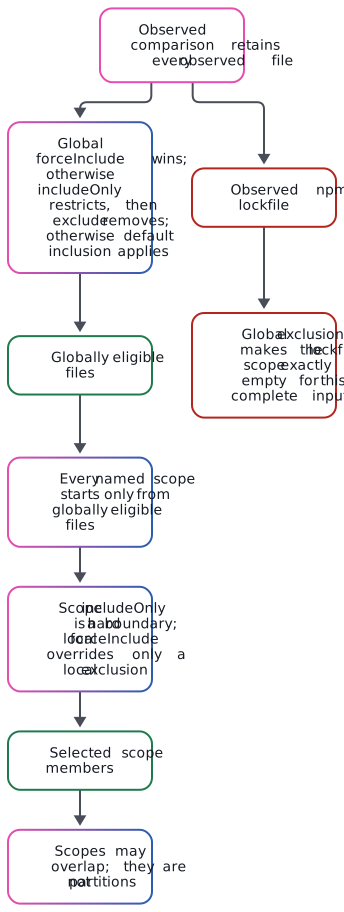
The lockfile has not disappeared: it is still an observed record and remains available to an explicit all-files question. It simply never enters the population from which named scopes select. See the editable Mermaid source.
Scopes can overlap. Adding two scoped totals can double-count the same file; named scopes are not automatically a partition. Inspect selected identities when combining facts. Standard global file counters such as total/excluded are not valid per-scope measure shortcuts. A named metric already owns its declared scope; do not combine that metric shortcut with a second invocation scope, path or all-files selector.
Match repository paths, not filesystem paths
Section titled “Match repository paths, not filesystem paths”diffdevil-glob/1 is case-sensitive and anchored to the whole repository-relative
path on every operating system. / separates segments. * matches within one
segment, ? matches one non-separator Unicode scalar, and a whole ** segment
matches zero or more segments. Classes such as [a-z] and [!x] are supported.
**/*.md matches root README.md; dotfiles are not hidden by a separate rule.
Backslash is a literal character, not a Windows separator or escape. Use classes
[*], [?] or [[] for literal wildcard characters. Absolute paths, empty or
./.. segments, malformed classes, embedded ab**cd, brace expansion, extglob,
and standalone leading negation are rejected. Use the exclude field instead of
inventing a negative-pattern language. Matching never consults the filesystem.
glob(f.path, pattern) intentionally tests the current endpoint only.
pathMatches(f, pattern) tests either available rename endpoint. A deletion’s
path identifies the removed path. A pure rename has zero line change only when
content identity was established; selection does not prove that identity.
Preserve incomplete membership
Section titled “Preserve incomplete membership”An incomplete source may contain definite observed files, possible selected files
and an unseen remainder. A filter does not turn the remainder into an empty array.
A total can be bounded or unknown even when every observed record looks ordinary.
Strict path output refuses unresolved membership rather than printing an apparently
complete list. certain(...) or --certain explicitly asks the narrower question
of definite observed members; it is not a way to acquire stronger evidence.
The real lockfile example compares selected views of an authentic frozen change. Use its actual catalogue variants when exploring; the Examples catalogue also contains bounded and incomplete file-set lessons. A live refresh is a different source edition, not a silent replacement of the frozen example.
Continue with From measurements to rules. The detail reference keeps collection membership, ordering and aggregation rules available for exact lookup.